In recent years, ChatGPT has become one of the most talked-about products ever, and the field of analytics is not exempt from its buzz. Its ability to generate detailed responses and handle a wide range of queries makes it a natural candidate for data analysis tasks. But when the stakes are high, one needs to consider whether ChatGPT is the best fit or if there are better alternatives.
To find out, I tested both ChatGPT and Enola on an actual business use case I had recently handled: “How can we reduce procurement lead time?”
In this blog, I’ll walk through my experience with both tools, share where each shines, and explain why Enola emerges as a strong ChatGPT alternative for real-world data analysis.
Why Reducing Procurement Lead Time Matters
Before diving into the tools, it’s worth pausing on the question itself. Procurement lead time is a core driver of supply chain performance, an area where applications of GenAI are being explored with gusto. Long lead times increase inventory holding costs, tie up capital in safety stock, and reduce a company’s ability to respond to market shifts. Shorter lead times improve supplier reliability, reduce disruption risks, and directly improve customer satisfaction by speeding up delivery.
In short, this is not an academic exercise. Procurement lead time is a practical business lever with strategic consequences. That made it the perfect test case for comparing two very different AI analysis approaches.
My Experience with ChatGPT
Setup and Workflow
I started with ChatGPT. Uploading a CSV file was straightforward, and I could ask questions in plain English. The setup was intuitive, and ChatGPT even suggested follow-up statistical analyses to explore drivers of lead time.

Strengths
I was impressed by ChatGPT’s depth. It generated multiple graphs, correlation insights, and surfaced six key levers that could reduce lead times, each with corresponding observations and recommended actions. It felt like having a data-savvy analyst walking me through possibilities.
Limitations
However, the experience came with friction.
First, ChatGPT doesn’t connect directly to databases or data warehouses. That meant I could only analyze static files, not live, continuously updated business data in my data warehouse. Second, the response was verbose: about 1,300 words of text plus several graphs. While detailed, it was difficult to parse quickly.
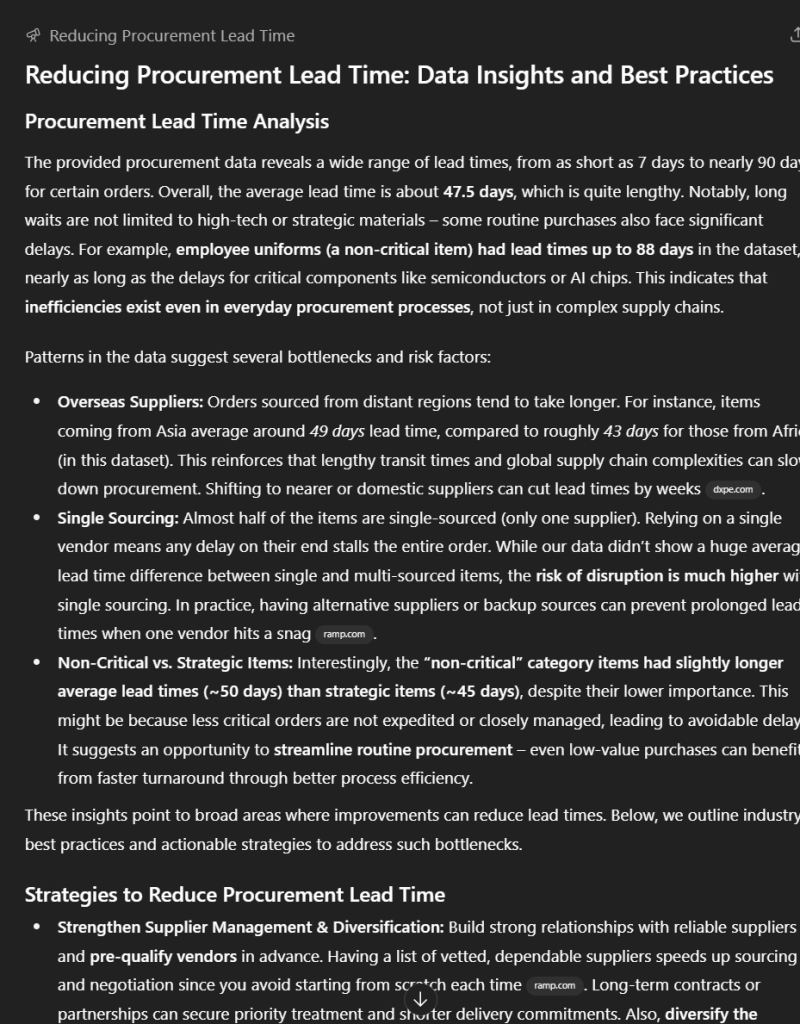
Even when using “deep research,” the clarifying questions ChatGPT posed felt unnecessary in this context. After six minutes of waiting, I had a rich but overwhelming set of findings that required effort to interpret.
Extra time is, of course, a luxury that is increasingly unaffordable for analysts as well as business users.
My Experience with Enola
Setup and Workflow
Next, I turned to Enola. The setup was equally simple: I could upload a CSV file, or connect directly to data warehouses like Snowflake, BigQuery, or Databricks. From there, I just typed my business question in plain English.
The ability to connect directly to data warehouses stood out as a clear winner to me.

Strengths
The difference in outputs was immediately noticeable.
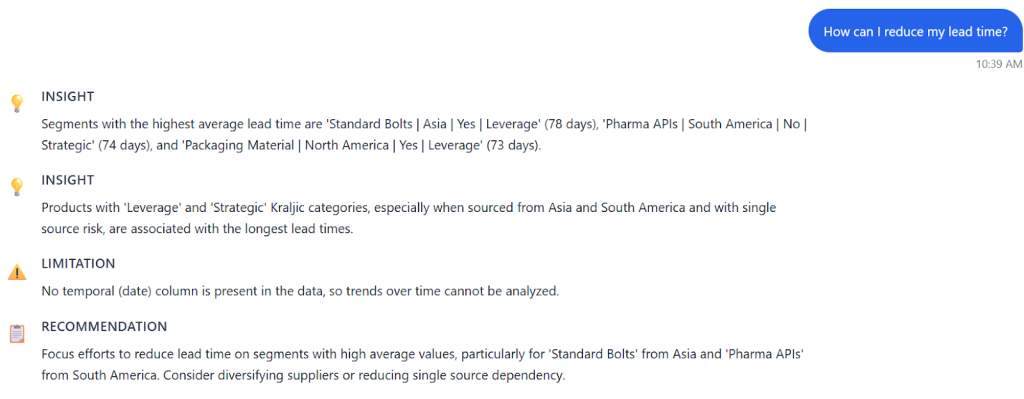
Instead of long text blocks, Enola structured its response under three clear headers: Insights, Limitations, and Recommendations. It also generated a single, clean visualization showing average lead times by region, risk, and product category. In a single view, I could pinpoint the combinations driving the longest delays.
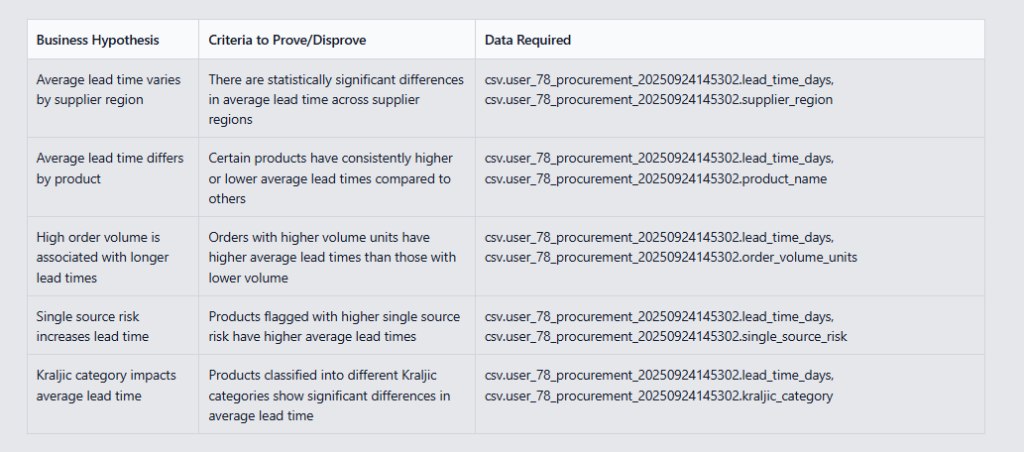
When I used Enola’s “Deep Analysis” feature, it went a step further. It asked clarifying questions, such as which product category to prioritize, whether to consider negative trends, and which stakeholders to focus on. It also generated hypotheses for reducing lead times and provided flexibility to add or refine them.
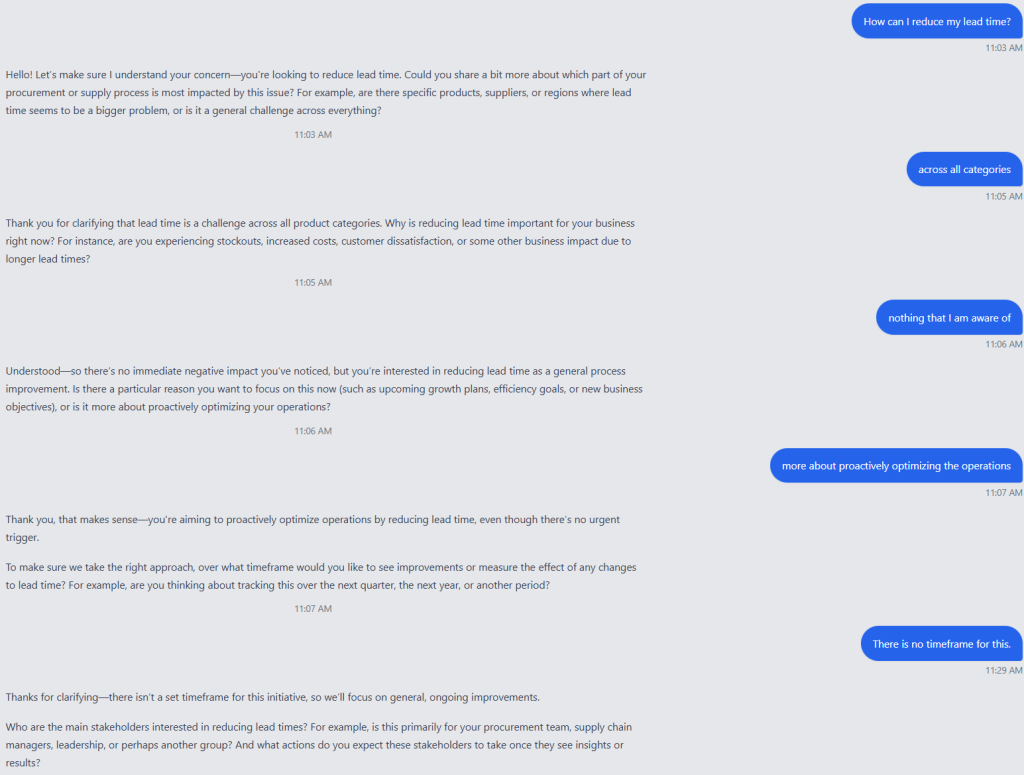
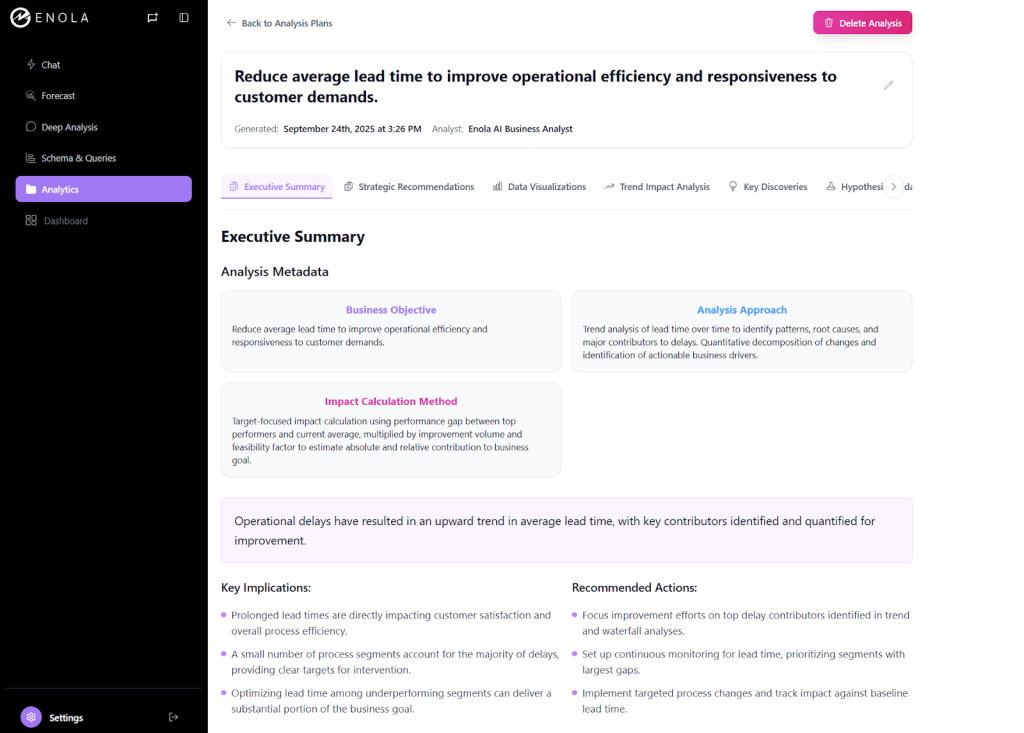
For business leaders, the executive summaries were concise and actionable. For analysts like me, the analysis plan included hypotheses and statistical options, bridging technical depth with business clarity.
Limitations
While Enola generates visualizations quickly, the customization options are limited. This means users may not always be able to adjust the visuals exactly to their preferred style or format. I got the feeling that this was intentional: there are plenty of products out there with the fanciest customization options, but none of them are as simple, intuitive, or goal-driven as Enola.
Side-by-Side Comparison: Enola vs. ChatGPT
Accuracy and Quality of Insights
- ChatGPT delivered a broad sweep of detailed findings, multiple graphs, and correlations. Good for exploration, but harder to distill into decisions.
- Enola focused on clarity, surfacing key drivers with structured summaries and concise visuals.
Speed and Efficiency
- ChatGPT: Took ~6 minutes to generate verbose outputs.
- Enola: Produced structured results in 2-3 minutes, making iteration faster.
Usability and Cognitive Load
- ChatGPT: Moderate effort. Outputs required analyst-level parsing.
- Enola: Low effort. Clear, business-friendly insights with minimal back-and-forth.
Actionability of Outputs
- ChatGPT: Rich but overwhelming; actions buried in text.
- Enola: Straightforward recommendations, hypotheses, and visual evidence in a digestible format.
When to Use ChatGPT vs. Enola
From my test, I’d frame it this way:
- ChatGPT is a strong fit if you’re an analyst looking to explore data in depth, experiment with correlations, or generate multiple angles of analysis. Its strength lies in breadth and technical exploration.
- Enola is a better fit when the business question needs clear, actionable outputs. It serves both analysts and executives by structuring insights, connecting to live data sources, and aligning analysis with decision-making.
Why Enola is the Better ChatGPT Alternative for Data Analysis
After comparing both tools, here’s why I consider Enola the stronger ChatGPT alternative for data analysis:
- Purpose-built for business data: Unlike ChatGPT, Enola connects directly to data warehouses as well as CSVs, making it suitable for ongoing business operations.
- Structured clarity: Outputs are framed as Insights, Limitations, and Recommendations, making it easier to move from analysis to action.
- Hypothesis-driven analytics: Enola doesn’t just describe data, it generates and tests hypotheses, supporting decision-making at both strategic and operational levels.
- Executive-ready outputs: Business leaders can grasp the main takeaways without sifting through pages of text.
For me, that makes Enola more than a “ChatGPT alternative.” It’s a tool designed specifically for analytics in real-world business contexts.
My test confirmed what I suspected going in: while ChatGPT is powerful, it’s not always optimized for business analysis. Its verbosity and lack of live database connections make it more analyst-friendly than executive-ready.
Enola, by contrast, delivers clarity, speed, and structured insights that translate directly into action. For the procurement use case, I could immediately see the drivers of long lead times and explore hypotheses for reducing them—all in minutes.
If you’re looking for a ChatGPT alternative for data analysis, especially in procurement and supply chain contexts, Enola offers the balance of depth and usability that decision-makers need.
Related Blog: